Basic Music Player

Basic Music Player
FEATURES
This script allows the player to bring up a list of music to play. This can be added as a menu option or called via an event call.
You can choose to add all files from a folder to this list or allow the player to collect music during the game by adding new songs with script calls in events.

The player can now set vehicle bgm and battle bgm to a song that they have learned and change it any time they wish.
Use a script call to return the battle bgm to the player’s choice after a boss fight changed it.

DOWNLOAD:
Get it here >

Multiple Storage Containers

Multiple Storage Containers
FEATURES
Allows you to make any event a storage container and able to add or remove items from it with a script call. By default the containers are empty, but you can populate a container any time you choose with script calls.
A bit of a warning, I have no idea the limitations of storing data and would be interested to know if any issues arose from storing hundreds of items across hundreds of event containers.

DOWNLOAD:
Get it here >

Emotional Responses

Emotional Responses
FEATURES
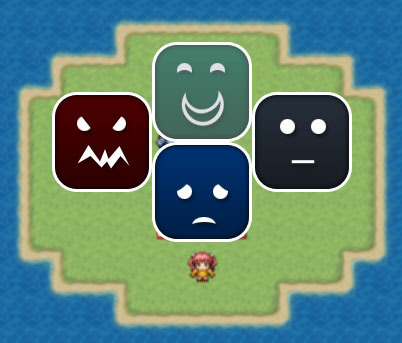
A graphical selection option that can display when the player needs to make an emotional choice (by default: angry, sad, happy or none).
Script calls can be used in conditional branches after this selection to determine what happens depending on the player’s choice.

Every time a choice is made, a point is stored with the leader actor, to keep track of how many times that actor gets angry, sad, happy or is neutral. You can use script calls to use this data for other eventing purposes such as people responding to you differently if you are a more angry or a more happy person.

Yes, this could easily be done with show choices and variables, but I thought someone might be interested to use a gimmick graphic menu and easier storing of response data.

DOWNLOAD:
Get it here >

Messages Without Wait

FEATURES
Messages do not stop the player from moving and will disappear if the player walks a certain distance away from where the message was activated (much like Chrono Trigger).
– During the game, you can change the message-close distance by using a variable.
– Can turn the no-wait feature on and off with a switch.

I kind of gave up on this script as I failed at working out how to do things I wanted to.
– While event commands after the message don’t wait for the message to finish, the demo includes evented ways around it.

It may come in handy, so I thought I would post it anyway, but use at your own risk.

DOWNLOAD:
Get it here >

Cam Control

FEATURES
A simple script that allows some controls over the screen position/camera. It allows you to:
– Pan the camera and then lock to x, y coordinates.
– Pan the camera to an event and then follow that event
– Pan the camera back to player
– Can also snap the camera instantly to event, player or x,y location

NOTE: This script only works correctly with default screen size. An improved version has been written here.

DOWNLOAD:
Get it here >

Parameter Names

FEATURES
Allows you to change the parameter names for certain classes (eg. hp, mp, tp, atk, def, agi, etc.)
Leave blank to use the default vocab names (specified in the rpgmaker database).

NOTES / ISSUES
Any script that uses the vocab will likely not recognise the class param names (and therefore use the default instead).
Combat messages and popups won’t use the class param names for buff/debuffs etc.

DOWNLOAD:
Get it here >

Keypad Input


FEATURES
The keypad is just a fancy version of the ‘Number Input’ event command.
It outputs a number to a variable based on what was input.
From then on, it’s up to your eventing skills what to do with the number.

Set a variable for it to use and maximum numbers allowed to be input.

DOWNLOAD:
Get it here >

Region Effects


FEATURES
Specify effects you want to happen on designated region tiles.
Region effects can include:
– A sound effect (automatically varies volume and pitch so not to be repetitive)
– An event that appears at the player’s location (for example, footprints. These events are stored on a designated map)
– Activating a common event
I figure with access to these three things (and some eventing knowledge), you can create a region effect that does nearly anything you want so you don’t have to spam events everywhere.

DOWNLOAD:
Get it here >

Pawn Shop

FEATURES
1. Sell only specified items by using the RPGMaker shop processing list and flipping a switch.
2. Set the selling rate of the items using a variable (so you can change any time in game).
3. Notetag armors, weapons and actors with bonuses or penalties to this selling rate.
4. Selling rate appears in the pawn shop scene and changes colors – to green if party has a bonus to the default or red if they are at a penalty.
5. Normal shop functionality remains the same while the switch is off.

DOWNLOAD:
Get it here >

Random Loot

FEATURES
1. Set chests to give random loot through a customizable script. These random items are based on item rarity value with min and max level restrictions.
2. Tag items as “lucky” that will increase the chance of getting rarer loot from chests when equipped.
3. Set a troop ID and Monster-in-a-box chance. Set if it’s possible to escape monsters or not.

DOWNLOAD:
Get it here >

Variable Timer Functions


FEATURES
1. Use a variable to control timer speed and if the timer is counting up or counting down.
2. Choice to disable ‘battle abort’ when timer reaches 0 in battle.
3. Ability to hide timer while it’s still running with a switch.
4. Ability to add a graphic that appears behind the timer.
5. Ability to change font, font size and font colour of timer numbers.
6. Script calls that allow you to:
– increase/decrease timer by seconds or by a variable.
– set the timer to a variable.
– freeze/unfreeze timer

All the normal event actions work (start, stop, conditional branch, make a variable equal to timer, etc.)

DOWNLOAD:
Get it here >