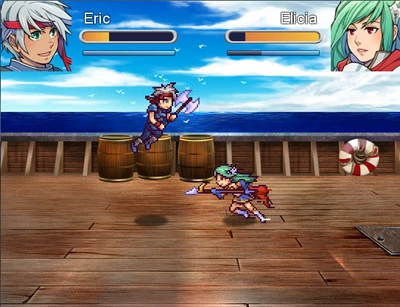
Actor Duel Mini Game

Actor Duels Mini Game

FEATURES
This script adds a scene where you can face two actors against each other in a mini-game duel that plays similar to a fighting game.
You can do Player1 VS AI or Player1 VS Player2 (on same computer).

The combat itself is fairly basic, you can move, jump, attack and block, using the actors’ stats and hp to determine damage. Each actor also has stamina that can prevent them from attacking when it gets too low.

How to Use
1. Get holder style battlers (http://animatedbattlers.wordpress.com/)
2. Import battlers into /Graphics/Battlers folder
3. Copy kombat_bar.png from /Graphics/System folder to your project
4. Put this script below Materials and above main.
5. Read all instructions and settings
6. Remember to start a NEW GAME instead of loading a save file that was made prior to adding this script

DOWNLOAD:
Get it here >

Battle Pets

Galvs battle pets
Galvs battle pets

FEATURES
This scripts allows you to equip pets to your actors that grant skills and abilities. These pets will appear alongside animated battlers (if you are using a compatible animated battlers script). A menu scene is also available to equip, feed and view your pets. Feeding a pet increases their level and also the bonuses they give to actors.
The script uses Holder’s Mag series of battlers.

Currently tested and working with:
– Galv’s Animated Battlers
– Victor’s Animated Battlers + Actor Battlers (both required)
– Yami’s Battle Symphony

This script is NOT plug and play or friendly for new users. It requires a lot of setup and understanding of rpgmaker database.

How to Use
1. Get holder style battlers + mags (http://animatedbattlers.wordpress.com/)
2. Import battlers into /Graphics/Battlers folder
3. Put this script below Materials and above main. Make sure it is under any battle scripts in the script list also
4. Read all instructions and settings
5. Set up desired pets in the PET SETUP section
6. Set up LEVEL TYPES for those pets
7. Set up the armors assosciated with those pets
8. Remember to start a NEW GAME instead of loading a save file that was made prior to adding this script
9. Keep in mind I spent ages writing detailed info on how to use this. Before you ask how something is done, please read over it!

DOWNLOAD:
Get it here >